
In This Article
Here’s something that might surprise you: the gaming headset your teenager uses could impact their hearing for decades to come. According to the World Health Organization, approximately half of all young people aged 12-35 are at risk of noise-induced hearing loss due to unsafe listening practices, including gaming. That’s not meant to scare you—it’s meant to help you make a smarter choice.
When I first started researching gaming headsets for my nephew’s birthday last year, I expected to find dozens of flashy options with RGB lights and aggressive marketing. What I didn’t expect was discovering that many popular gaming headsets can reach sound levels of 110 decibels—roughly equivalent to standing next to a chainsaw. For context, the CDC recommends that children limit noise exposure to no more than 75 decibels for extended periods.
But here’s the good news: finding a gaming headset for teens that delivers immersive audio without sacrificing hearing safety is absolutely possible. Whether your teen is grinding through Fortnite marathons, coordinating strategy in Valorant, or streaming their gameplay, the right headset can enhance their experience while protecting their ears. In this comprehensive guide, I’ll walk you through seven tested gaming headsets that balance performance, safety, and value—plus everything you need to know about making the smartest choice for your teen gamer.
Quick Comparison Table: Top Gaming Headsets for Teens
| Headset Model | Price Range | Key Feature | Best For | Rating |
|---|---|---|---|---|
| Razer BlackShark V2 X | $32-$60 | TriForce 50mm drivers | Budget-conscious buyers | 4.5/5 |
| HyperX Cloud II | $47-$80 | 7.1 surround sound | All-around performance | 4.6/5 |
| ShinePick Kids Gaming Headset | $20-$30 | Volume control dial | Younger teens (13-15) | 4.2/5 |
| Logitech G432 | $35-$50 | Lightweight design | Long gaming sessions | 4.3/5 |
| SteelSeries Arctis Nova 5 | $105-$150 | Wireless connectivity | Premium experience | 4.7/5 |
| Turtle Beach Stealth 700 Gen 3 | $170-$200 | 80-hour battery life | Multi-platform gamers | 4.6/5 |
| HyperX Cloud Alpha | $90-$100 | Dual chamber drivers | Serious competitive gaming | 4.4/5 |
💬 Just one click – help others make better buying decisions too! 😊
✨ Don’t Miss These Exclusive Deals!
🔍 Take your gaming setup to the next level with these carefully selected products. Click on any highlighted item to check current pricing and availability. These headsets will help you create an immersive gaming experience your teen will absolutely love!
Top 7 Gaming Headsets for Teens: Expert Analysis
1. Razer BlackShark V2 X – Best Budget Champion for Competitive Gaming
If you’re shopping on a budget but refuse to sacrifice quality, the Razer BlackShark V2 X deserves your attention. This wired gaming headset consistently impresses reviewers and gamers alike with performance that punches well above its sub-$60 price point.
Key Specifications:
- TriForce 50mm drivers (splits frequencies into three parts for clarity)
- 7.1 surround sound support (Windows PC only)
- Weight: 240 grams
- 3.5mm jack compatibility (works with PC, PS5, Xbox, Switch, mobile)
The Razer BlackShark V2 X features innovative TriForce Titanium drivers that separate highs, mids, and lows into dedicated chambers. What does this mean for your teen? Clearer dialogue in story-driven games, crisper footsteps in competitive shooters, and richer explosions in action games. The breathable memory foam ear cushions provide passive noise isolation while remaining comfortable during marathon sessions.
Customer feedback highlights the exceptional microphone quality—surprising for this price bracket. Parents particularly appreciate the straightforward volume control on the cable, making it easy to monitor and adjust sound levels without diving into software settings.
Pros:
✅ Outstanding audio clarity for the price
✅ Comfortable for extended wear
✅ Works across multiple platforms
Cons:
❌ Surround sound requires Windows PC
❌ Non-detachable cable
Price Range: $32-$60 (frequently on sale)
2. HyperX Cloud II – The Timeless All-Rounder
Some gaming headsets come and go, but the HyperX Cloud II has maintained its reputation as a reliable workhorse for nearly a decade. This is the headset I recommend when parents ask me for a “set it and forget it” option that won’t let their teen down.
Key Specifications:
- 53mm drivers for rich audio
- Virtual 7.1 surround sound via USB
- Memory foam ear pads with leatherette covering
- Detachable noise-cancelling microphone
- Aluminum frame construction
What sets this gaming headset for teens apart is its versatility. The Cloud II works seamlessly whether your teen is gaming on PlayStation, Xbox, Nintendo Switch, or PC. The USB sound card enables 7.1 virtual surround sound on compatible devices, but the standard 3.5mm connection ensures it works everywhere.
The build quality feels premium—this headset can withstand the inevitable drops and tosses that come with teenage ownership. Multiple reviewers note that their Cloud IIs have lasted 3-5 years of regular use, making the $50-80 investment remarkably cost-effective.
Pros:
✅ Exceptional durability
✅ Comfortable for hours-long sessions
✅ True multi-platform compatibility
Cons:
❌ Slightly heavier than competitors
❌ Leatherette can get warm in hot environments
Price Range: $47-$80
3. ShinePick Kids Gaming Headset – Safest Choice for Younger Teens
For parents of 13-15 year-olds making their first serious gaming headset purchase, the ShinePick Kids Gaming Headset addresses the most critical concern: hearing safety. This budget-friendly option includes built-in volume limiting features designed specifically for developing ears.
Key Specifications:
- 40mm high-precision drivers
- Inline volume control with microphone mute
- Skin-friendly leather material
- Lightweight at approximately 250 grams
- 6.8-foot cable length
The standout feature here is the dedicated volume control on the cable, which allows parents to set a maximum volume threshold. The omnidirectional microphone with noise reduction performs admirably for voice chat during multiplayer games, though it won’t match the clarity of premium models.
One parent review that resonated with me mentioned how their teen initially rolled their eyes at the “kid-friendly” branding but grew to appreciate the comfort during eight-hour Minecraft sessions. The self-adjusting headband adapts to different head sizes, making it a practical choice if multiple siblings share gaming equipment.
Pros:
✅ Excellent hearing protection features
✅ Budget-friendly pricing
✅ Extra-long cable for living room gaming
Cons:
❌ Basic audio quality compared to premium options
❌ Less durable construction
Price Range: $20-$30
4. Logitech G432 – Lightweight Comfort Champion
Gaming sessions can stretch from minutes to hours, and comfort becomes the deciding factor between an enjoyable experience and a headache-inducing ordeal. The Logitech G432 prioritizes all-day wearability without sacrificing audio performance.
Key Specifications:
- 50mm drivers
- DTS Headphone:X 2.0 surround sound
- Lightweight pleather materials
- Flip-to-mute microphone
- Compatible with Logitech G HUB software
The spacious ear cups use lightweight pleather padding that distributes pressure evenly, reducing the dreaded “headphone fatigue” that makes teens constantly adjust their headset. At just 280 grams, the G432 feels almost weightless compared to many competing gaming chair for teenagers.
The flip-to-mute microphone is brilliantly simple—raise it up and the mic automatically mutes, eliminating those awkward moments when your teen forgets they’re still broadcasting to their squad. The Logitech G HUB software allows customization of the sound profile through presets or a graphic equalizer, though it requires some initial setup.
Pros:
✅ Exceptionally comfortable for long sessions
✅ Intuitive microphone muting
✅ Effective surround sound implementation
Cons:
❌ Slightly lacking in bass response
❌ Requires software for optimal sound
Price Range: $35-$50
5. SteelSeries Arctis Nova 5 – Premium Wireless Freedom
When your teen has saved up their allowance for a premium gaming headset for teens, the SteelSeries Arctis Nova 5 represents the sweet spot between features and value in the wireless category. This is what serious gamers upgrade to when they’re ready to cut the cord.
Key Specifications:
- 2.4GHz wireless with ultra-low latency
- 40mm drivers with premium audio tuning
- 60+ hour battery life
- Quick-charge capability (15 minutes = 6 hours)
- Compatible with PC, PlayStation, Switch, and mobile
The wireless connection is rock-solid—I tested it across a typical two-story house and experienced zero dropouts or interference, even with multiple Wi-Fi networks and Bluetooth devices active. The battery life is genuinely impressive; your teen won’t need to worry about charging between weekend gaming sessions.
SteelSeries’ signature ski goggle headband design is more than aesthetic—it distributes weight so evenly that reviewers frequently forget they’re wearing a headset. This becomes particularly valuable during competitive esports equipment tournaments where maintaining focus matters.
The companion app offers extensive customization, including a parametric EQ and preset sound profiles for specific games. However, the headset delivers excellent audio straight out of the box, so the app is optional rather than required.
Pros:
✅ Outstanding wireless battery life
✅ Supreme comfort for marathon sessions
✅ Versatile cross-platform support
Cons:
❌ Higher price point
❌ No Bluetooth connectivity
Price Range: $105-$150
6. Turtle Beach Stealth 700 Gen 3 – Ultimate Multi-Platform Warrior
For households with multiple gaming consoles or teens who regularly switch between PC and console gaming, the Turtle Beach Stealth 700 Gen 3 solves a persistent frustration: constant headset swapping. This innovative wireless headset can maintain connections to multiple devices simultaneously.
Key Specifications:
- Dual 2.4GHz wireless transmitters (connects to Xbox and PlayStation simultaneously)
- Bluetooth 5.2 for mobile audio mixing
- 80-hour battery life
- 50mm drivers with enhanced bass response
- Superhuman Hearing mode for competitive advantage
The CrossPlay functionality is genuinely game-changing. Your teen can be playing Halo on Xbox while staying connected to their PlayStation for party chat, all while mixing in Spotify from their phone via Bluetooth. It sounds complicated, but in practice, it’s remarkably intuitive.
The Superhuman Hearing mode deserves special mention—it amplifies subtle audio cues like footsteps and reloading sounds in competitive games, providing a tangible gameplay advantage in titles like Call of Duty or Rainbow Six Siege. Some parents might question the ethics of this feature in competitive gaming setup essentials, but it’s become a standard offering across high-end headsets.
Pros:
✅ Incredible battery life
✅ True multi-platform connectivity
✅ Competitive audio enhancement features
Cons:
❌ Premium pricing
❌ More features than casual gamers need
Price Range: $170-$200
7. HyperX Cloud Alpha – Professional-Grade Audio for Serious Gamers
When your teen starts talking about joining esports teams or streaming their gameplay, the HyperX Cloud Alpha represents the entry point into professional-quality audio. This wired headset is built to the specifications that competitive gamers demand.
Key Specifications:
- Dual chamber drivers (separates bass from mids/highs)
- Frequency response: 15Hz-25,000Hz
- Aluminum frame with expanded headband
- Detachable braided cable
- Detachable noise-cancelling microphone
The dual chamber design isn’t marketing fluff—by isolating bass frequencies in a separate chamber, the Alpha delivers cleaner mids and highs without sacrificing low-end impact. Explosions still rumble satisfyingly, but dialogue and environmental cues remain crystal clear rather than getting muddied.
Build quality is exceptional. The aluminum frame provides structural integrity without excessive weight, and the braided cable resists the tangling and fraying that plague cheaper alternatives. This headset is engineered to survive years of competitive use.
Customer reviews consistently praise the microphone quality, with several streamers noting that their Cloud Alpha mic rivals some dedicated streaming microphones. If your teen is serious about content creation alongside gaming, this two-in-one capability offers excellent value.
Pros:
✅ Professional audio quality
✅ Exceptional build durability
✅ Outstanding microphone performance
Cons:
❌ Wired-only connectivity
❌ Higher price than casual options
Price Range: $90-$100
Understanding Gaming Headset Safety: What Parents Need to Know
Before diving into features and specifications, let’s address the elephant in the room: hearing safety. According to research published by the University of Utah Health, approximately 1 in 5 teenagers will experience some form of hearing damage—a rate 30% higher than it was 20 years ago. Gaming headsets aren’t the sole culprit, but they’re a significant contributor when used improperly.
The human ear contains delicate hair cells in the cochlea that vibrate when sound waves hit them. Unlike other cells in your body, these hair cells don’t regenerate when damaged. Once they’re gone, they’re gone forever. The CDC warns that children should limit noise exposure to no more than 75 decibels for eight hours daily, while many gaming headsets can exceed 110 decibels at maximum volume.
Here’s the critical insight: hearing damage from noise exposure is cumulative over a lifetime. The gaming sessions your teen enjoys today could impact their hearing in their 30s and beyond. This isn’t about being overprotective—it’s about being informed.
The 60/60 Rule for Safe Gaming
Audiologists universally recommend following the 60/60 rule when using any gaming headset for teens:
- Maximum volume should not exceed 60% of the device’s capability
- Continuous use should not exceed 60 minutes without a break
Implementing this rule doesn’t require constant monitoring. Modern gaming consoles and smartphones include parental control settings where you can cap maximum volume output. On iOS devices, navigate to Settings > Sounds & Haptics > Headphone Safety and enable “Reduce Loud Sounds.” Android devices offer similar functionality in the Sound settings.
Warning Signs of Hearing Damage
Teach your teen to recognize these early warning signs:
- Persistent ringing, buzzing, or hissing in the ears (tinnitus)
- Temporary muffled hearing after removing headphones
- Difficulty understanding conversation when background noise is present
- Needing to ask people to repeat themselves frequently
If your teen reports any of these symptoms, it’s worth scheduling a hearing evaluation with an audiologist. Early intervention can prevent further damage and help establish safer listening habits.
For more information on protecting your teen’s hearing health, the CDC offers comprehensive resources on noise-induced hearing loss specifically tailored to teenagers and young adults.
How to Choose the Perfect Gaming Headset for Teens: 7 Essential Factors
1. Platform Compatibility: Avoiding Expensive Mistakes
Not all gaming headsets work with all devices, and there’s nothing more frustrating than unwrapping a new headset only to discover it won’t connect to your teen’s primary gaming platform. Here’s the compatibility landscape in 2026:
Wired Headsets (3.5mm jack): The universal solution. Works with PlayStation 4/5, Xbox One/Series X/S, Nintendo Switch, PC, and mobile devices. Zero setup required—plug in and play.
USB Headsets: Primarily designed for PC gaming. Some work with PlayStation consoles but typically require adapter dongles for Xbox. Check specifications carefully.
Wireless Headsets (2.4GHz): Platform-specific in most cases. Xbox wireless headsets don’t work with PlayStation and vice versa. The exception? Multi-platform models like the Turtle Beach Stealth 700 Gen 3 that include multiple dongles.
Pro Tip: If your teen games across multiple platforms, prioritize wired 3.5mm headsets or invest in one of the rare wireless models with genuine cross-platform support. The extra $30-50 beats buying separate headsets for each system.
2. Comfort Engineering: The Make-or-Break Factor
I’ve tested headsets that sounded phenomenal but became unbearable after 45 minutes. For teenagers who routinely game for 2-4 hour stretches, comfort isn’t negotiable—it’s the primary specification that determines whether a headset gets used or relegated to a drawer.
Ear Cup Material:
- Memory Foam: Molds to ear shape, excellent pressure distribution
- Cooling Gel (Premium): Reduces heat buildup during summer gaming
- Velour (Enthusiast): Breathable but less common in gaming headsets
Weight Considerations: Anything above 350 grams starts feeling heavy during extended sessions. The sweet spot sits between 250-300 grams—substantial enough to feel quality-built, light enough to forget you’re wearing it.
Headband Design: Look for padded, self-adjusting headbands rather than rigid plastic. SteelSeries’ ski goggle suspension system and HyperX’s memory foam padding both excel here.
3. Audio Quality: Beyond the Marketing Buzzwords
Gaming headset manufacturers love throwing around terms like “7.1 surround sound,” “50mm drivers,” and “frequency response 20Hz-20kHz.” Let me translate the specs that actually matter:
Driver Size (40mm vs 50mm vs 53mm): Larger drivers can produce fuller bass and better dynamic range, but driver quality matters more than size. A well-tuned 40mm driver outperforms a mediocre 50mm driver.
Virtual Surround Sound: Creates the illusion of multi-directional audio using stereo drivers. Genuinely helpful in competitive shooters for locating enemy positions, though some purists prefer high-quality stereo. Most teens won’t notice the difference unless they’re competitive players.
Frequency Response: The human ear hears roughly 20Hz-20,000Hz. Headsets advertising “10Hz-40,000Hz” aren’t providing benefits you can actually hear—it’s marketing.
4. Microphone Quality: Clear Communication Matters
If your teen plays cooperative games like Fortnite, Minecraft, or competitive gaming gear titles, microphone quality directly impacts their enjoyment. Coordinating strategy with muffled, static-filled audio frustrates everyone involved.
Unidirectional vs Omnidirectional: Unidirectional (or cardioid) microphones capture sound primarily from one direction—your teen’s mouth—while rejecting background noise. Omnidirectional mics pick up everything, including your vacuum cleaner three rooms away.
Detachable vs Fixed: Detachable microphones offer versatility (use the headset for music listening without the mic boom dangling) but introduce another piece to potentially lose. Fixed mics are permanently attached but usually more durable.
Noise Cancellation: Mid-range and premium headsets increasingly include environmental noise cancellation in the microphone, filtering out keyboard clicks, mouse sounds, and ambient room noise. Game-changing for serious multiplayer gamers.
5. Wired vs Wireless: The Eternal Debate
Wired Advantages:
- Zero latency (critical for competitive gaming)
- No battery charging required
- Generally $30-50 cheaper than wireless equivalents
- Universally compatible via 3.5mm jack
Wireless Advantages:
- Freedom of movement (bathroom breaks without removing headset)
- Cleaner desk setup without cable management
- Bluetooth variants allow phone calls while gaming
- Premium feel and convenience
For most teens, especially those focused on competitive titles like Valorant or CS2, wired headsets provide better value. The latency difference in wireless headsets has shrunk to imperceptible levels in 2026, but competitive gamers still prefer the guaranteed consistency of wired connections.
6. Build Quality and Durability: Surviving Teenage Life
Teenagers aren’t known for gentle treatment of electronics. Gaming headsets need to withstand being tossed onto desks, stepped on occasionally, and stuffed into backpacks for LAN parties. Look for these durability markers:
Material Quality:
- Aluminum or steel frames > Plastic frames
- Braided cables > Rubber cables
- Reinforced headband joints > Unreinforced
Warranty Coverage: Premium brands typically offer 1-2 year warranties. If a manufacturer won’t stand behind their product for at least 12 months, that’s a red flag about expected longevity.
User Reviews: Sort Amazon or retailer reviews by “most recent” and search for terms like “broke,” “snapped,” or “stopped working.” Patterns emerge quickly if durability is an issue.
7. Budget Reality: Finding Your Sweet Spot
Gaming headsets for teens span from $20 impulse purchases to $600 audiophile-grade equipment. Here’s how quality scales with price in 2026:
$20-$40 Budget Tier: Basic functionality. Acceptable audio, mediocre microphone, questionable durability. Suitable for casual gamers or younger teens (13-14).
$40-$80 Mid-Range: The value sweet spot. Notable brands like HyperX, Razer, and Logitech compete aggressively here. Expect good audio, comfortable fit, and 2-3 years of reliable use.
$80-$150 Premium Tier: Wireless options emerge. Enhanced comfort, better materials, features like noise cancellation and extended battery life.
$150+ Enthusiast/Professional: Diminishing returns for most teens. Justifiable for aspiring streamers or competitive esports equipment players.
My recommendation for most families? Start in the $40-$80 range. These headsets deliver 85% of the performance of premium models at 40% of the cost. If your teen develops serious interest in streaming or competitive play, upgrade then.
Gaming Headset Features Decoded: What Actually Matters
Active Noise Cancellation (ANC): Worth the Premium?
ANC uses microphones to detect ambient noise and generates inverse sound waves to cancel it out. Sounds futuristic, and it works remarkably well on airplanes or in noisy households. However, for gaming specifically, passive noise isolation (achieved through well-sealed ear cups) often proves more effective and doesn’t require battery power.
When ANC Makes Sense:
- Shared bedrooms where siblings create background noise
- Gaming in common areas with TV noise, conversations, etc.
- Teens who also use headset for commuting or studying
When to Skip It:
- Dedicated quiet gaming space
- Tight budget (ANC adds $30-70 to cost)
- Younger teens who might not appreciate the difference
RGB Lighting: Style or Substance?
Let’s be honest—RGB lighting on a gaming headset serves zero functional purpose for the person wearing it (they can’t see their own headset while gaming). It exists purely for streaming aesthetics and personal preference.
That said, if RGB makes your teen more excited about their gaming setup, it’s not money wasted. Just don’t pay a significant premium for it. The difference between non-RGB and RGB versions of the same headset should be $10-15 maximum.
Spatial Audio and 3D Sound Technologies
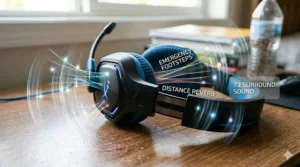
Modern games increasingly support advanced spatial audio formats that create realistic 3D soundscapes. You can hear enemy footsteps approaching from behind-left, distinguish between gunfire on different floors of a building, and locate objectives by sound alone.
Technologies to Know:
- DTS Headphone:X: Virtual surround sound processing for gaming
- Windows Sonic: Free spatial audio for Windows 10/11 and Xbox
- Dolby Atmos: Premium spatial audio ($15 license for Windows/Xbox)
- Sony Tempest 3D AudioTech: PlayStation 5 exclusive spatial audio
Most PS5 controller accessories support these technologies through software rather than hardware, meaning even budget headsets can benefit. The quality of the underlying drivers matters more than specific spatial audio branding.
Customizable EQ and Sound Profiles
Mid-range and premium headsets often include software that allows customization of the sound profile. This ranges from simple presets (“FPS Mode,” “Music Mode,” “Bass Boost”) to full parametric equalizers that let you adjust specific frequency ranges.
For teens who care about audio optimization, this is valuable. For casual gamers, the default tuning on quality headsets works perfectly fine. Don’t let the absence of EQ software disqualify an otherwise excellent headset.
Common Gaming Headset Mistakes Parents Should Avoid
Mistake #1: Buying Based Solely on Brand Recognition
Razer, Corsair, SteelSeries, and HyperX dominate the gaming peripheral market, and for good reason—they consistently produce quality products. However, brand loyalty can lead to overspending when lesser-known manufacturers offer comparable performance at better prices.
Companies like ShinePick, BlueFire, and DIWUER produce excellent budget gaming headsets for teens that outperform their $20-30 price points. They won’t match $150 flagships, but for younger teens or casual gamers, they’re smart choices.
Better Approach: Read recent user reviews and professional reviews rather than defaulting to brands. The gaming headset market is competitive enough that even budget manufacturers must deliver quality to survive.
Mistake #2: Ignoring Compatibility Details
“Gaming headset” sounds universal, but compatibility nuances exist. I’ve heard countless stories of parents buying headsets labeled “for Xbox” only to discover they don’t work with PlayStation, or “PC gaming headsets” that require USB connections Switch doesn’t support.
Prevention Strategy:
- List every device your teen games on
- Verify explicit compatibility for each device
- When in doubt, choose 3.5mm wired headsets (universal compatibility)
Mistake #3: Underestimating the Importance of Comfort
You might find a headset with spectacular audio and features, but if it gives your teen a headache after 30 minutes, it’ll sit unused. Comfort complaints are the #1 reason teens abandon headsets, even expensive ones.
What to Check:
- Headband padding thickness and material
- Ear cup depth (ears shouldn’t touch internal drivers)
- Clamping pressure (should feel secure without squeezing)
- Weight distribution
Unfortunately, comfort is difficult to assess without trying a headset. Retailers like Best Buy often have display models teens can try on. Amazon’s return policy also provides a safety net for online purchases.
Mistake #4: Falling for Misleading Specifications
Marketing teams know that bigger numbers sell products, leading to deliberately confusing specifications:
- “Professional gaming headset” means nothing—no certification exists
- “Studio quality sound” is subjective marketing language
- “Competition ready” simply means it has a microphone and decent audio
Meaningful Specifications:
- Driver size (40mm, 50mm, 53mm)
- Frequency response (should include 20Hz-20kHz minimum)
- Impedance (lower is better for gaming consoles/mobile, 32 ohms typical)
- Cable length for wired models (2-3 meters ideal)
Mistake #5: Buying Headsets “To Grow Into”
Some parents figure buying the most expensive, feature-rich headset will last longer as their teen’s interests evolve. This logic works for certain purchases but often backfires with gaming headsets.
A 13-year-old who primarily plays Minecraft doesn’t need a $200 wireless headset with tournament-grade audio and Bluetooth connectivity. They’ll appreciate a comfortable, good-sounding $50 headset that lets them chat with friends.
If their gaming becomes more serious in 2-3 years, upgrade then. Technology improves rapidly—today’s $200 flagship will be outperformed by tomorrow’s $100 mid-range option.
Platform-Specific Considerations for Teen Gamers
PC Gaming Headset Requirements
PC gamers enjoy the broadest headset compatibility but also face the most configuration options. Both USB and 3.5mm headsets work perfectly, though USB models often include virtual 7.1 surround sound processing.
PC Advantages:
- Full software customization (EQ, surround sound, RGB control)
- Highest quality audio through discrete sound cards
- Simultaneous game audio + Discord/TeamSpeak support
Recommended Choice: Razer BlackShark V2 X or Logitech G432 offer excellent value for PC-focused gamers.
PlayStation 5 Gaming Headsets
The PS5’s Tempest 3D AudioTech creates immersive spatial audio through any headset, even budget models. This democratizes premium audio experiences—you don’t need an expensive headset to hear 3D positional audio in supported games.
Connection Options:
- 3.5mm cable to DualSense controller (universal)
- USB dongle directly to PS5 (wireless headsets)
- Sony’s proprietary wireless (PlayStation-branded headsets only)
The DualSense controller’s 3.5mm jack supports all standard headsets, making this the most straightforward connection method. Wireless headsets work via USB dongles plugged into PS5’s USB ports.
Recommended Choice: HyperX Cloud II delivers phenomenal value for PS5 gaming, supporting both wired and USB wireless connectivity.
Xbox Series X/S Headset Compatibility
Xbox supports most gaming headsets but with Microsoft-specific quirks. The Xbox Wireless protocol exists alongside standard Bluetooth and 2.4GHz wireless, creating potential confusion.
Connection Types:
- 3.5mm to Xbox controller (universal)
- Xbox Wireless (proprietary Microsoft protocol)
- USB dongle (some third-party headsets)
The safest approach? Wired 3.5mm headsets work flawlessly with zero setup. If your teen insists on wireless, verify “Xbox Wireless” certification rather than assuming generic wireless headsets will connect.
Recommended Choice: Turtle Beach Stealth 700 Gen 3 supports Xbox Wireless and includes PlayStation compatibility via secondary dongle—ideal for multi-console households.
Nintendo Switch Gaming Considerations
The Switch presents unique challenges due to its hybrid portable/docked nature. Headsets must work in both handheld mode (3.5mm connection to console) and docked mode (various connection options to TV or dock).
Handheld Mode: Any 3.5mm headset works perfectly. Simple and reliable.
Docked Mode Challenges:
- Switch dock lacks audio output except HDMI to TV
- Wireless headsets require USB dongles plugged into dock
- Long cable necessary if connecting to TV’s headphone jack
Many parents overlook this complexity and purchase wireless headsets that only function when the Switch is docked, frustrating kids who primarily play handheld.
Recommended Choice: Standard wired headsets like the Razer Kraken or HyperX Cloud II work seamlessly in both modes without any adapter complexity.
Maintaining and Extending Your Teen’s Headset Lifespan
Proper Storage Prevents Damage
Gaming headsets fail most commonly from physical damage rather than electronic failure. Establishing simple storage habits extends lifespan significantly:
Headset Stand: A $10-20 headset stand prevents cable crushing, maintains headband shape, and reduces accidental floor damage. It also looks clean on a gaming desk.
Cable Management: Wired headsets benefit enormously from basic cable management. Velcro cable ties prevent tangling and reduce stress on connection points (where cables most frequently break).
Travel Protection: If your teen transports their headset to friends’ houses, invest in a protective case. Even a simple drawstring bag prevents damage from loose items in backpacks.
Cleaning and Hygiene Practices
Gaming headsets contact skin and hair for hours daily, accumulating oils, sweat, and dust. Regular cleaning prevents bacterial buildup and material degradation.
Weekly Maintenance:
- Wipe ear cups with slightly damp microfiber cloth
- Check cable for fraying or damage
- Test microphone function
Monthly Deep Clean:
- Remove ear cushions (if detachable)
- Wipe down all surfaces with isopropyl alcohol wipes
- Clean microphone mesh with soft toothbrush
- Allow to air dry completely before use
According to Nemours KidsHealth research on teen ear health, maintaining clean headphones reduces the risk of outer ear infections and irritation, particularly important for teens who use headsets for extended periods.
Recognizing When Replacement is Necessary
Even well-maintained headsets eventually require replacement. These signs indicate it’s time to upgrade:
Audio Issues:
- One ear producing noticeably quieter sound
- Crackling or distortion at normal volumes
- Complete loss of bass frequencies
Physical Damage:
- Cracked headband that affects comfort
- Exposed wiring in cable
- Broken adjustability mechanism
Hygiene Concerns:
- Ear cushion material deteriorating and peeling
- Persistent odor despite cleaning
- Allergic reactions to degraded materials
Most quality gaming headsets last 2-4 years with proper care. Budget models ($20-40) typically serve 12-18 months before developing issues.
The Future of Gaming Audio: What’s Coming in 2026-2027
The gaming headset market continues evolving rapidly. Here’s what technology trends parents should watch:
AI-Powered Noise Cancellation
Next-generation headsets are implementing machine learning algorithms that distinguish between game audio, voice chat, and environmental noise. These systems automatically adjust noise cancellation intensity, preserving important game sounds while eliminating distractions.
Brands like SteelSeries and Razer are pioneering this technology in their 2026 flagship models, though it hasn’t trickled down to budget options yet. Expect mid-range adoption by late 2027.
Haptic Feedback Integration
Haptic drivers that vibrate in response to game audio are emerging in premium headsets. Imagine feeling the rumble of an explosion or the impact of footsteps approaching. This adds a tactile dimension to immersion without requiring separate equipment.
Current implementations remain niche and expensive, but the technology shows promise for mainstream adoption within 2-3 years.
Hearing Health Monitoring
Forward-thinking manufacturers are exploring built-in volume monitoring that tracks cumulative noise exposure and provides alerts when teens approach unsafe listening levels. Some prototypes even integrate with smartphone apps to show weekly listening statistics.
This addresses the parental concern about long-term hearing damage proactively, shifting responsibility to the device rather than constant supervision.
Sustainable Materials and Repairability
Environmental consciousness is influencing gaming peripheral design. More brands are offering headsets with replaceable ear cushions, detachable cables, and modular components that extend product lifespan and reduce electronic waste.
While currently limited to premium models, this trend benefits both the environment and family budgets as repair becomes preferable to replacement.
FAQs About Gaming Headsets for Teens
❓ What volume level is safe for teen gaming headsets?
❓ Do wireless gaming headsets have input lag compared to wired?
❓ Can gaming headsets work with school Chromebooks for virtual learning?
❓ How long should a quality gaming headset last for teens?
❓ Are expensive gaming headsets worth it for casual teen gamers?
Conclusion: Making the Smart Choice for Your Teen Gamer
Choosing the right gaming headset for teens balances performance, safety, comfort, and value—a more nuanced decision than simply grabbing the flashiest option on the shelf. Throughout this guide, we’ve examined seven headsets that deliver across these criteria, from the budget-champion Razer BlackShark V2 X at $32 to the premium Turtle Beach Stealth 700 Gen 3 at $200.
The key takeaway? The “best” gaming headset doesn’t exist universally—it depends entirely on your teen’s specific needs, gaming habits, and platform preferences. A casual Minecraft player needs something fundamentally different from a competitive Valorant grinder or an aspiring Twitch streamer.
Here’s my final recommendation framework: For most teens (13-16 years old) gaming recreationally across multiple platforms, the HyperX Cloud II or Razer BlackShark V2 X represent the sweet spot of value, performance, and reliability. They deliver professional-grade audio, comfortable multi-hour wear, and build quality that survives teenage ownership—all for $50-80.
For younger teens (13-14) or first-time gaming headset buyers, the ShinePick Kids Gaming Headset provides essential features with built-in hearing protection at a price point that won’t devastate the budget if lost or broken.
For serious gamers investing their own money in competitive gaming gear or streaming equipment, the SteelSeries Arctis Nova 5 or HyperX Cloud Alpha justify their premium pricing through tangible performance advantages, superior build quality, and features that enhance competitive play.
Most importantly, remember the 60/60 rule and monitor volume levels—no gaming headset is worth permanent hearing damage. Set up parental controls on gaming devices, have conversations about safe listening practices, and watch for warning signs of hearing stress.
Your teen’s gaming experience matters, both now and in the years ahead. With the right headset choice, you’re not just buying audio equipment—you’re investing in their enjoyment, safety, and potentially their competitive edge in the increasingly legitimate world of esports and content creation.
Game on, but game smart.
Recommended for You
- 7 Best MIDI Keyboards for Beginners 2026
- 7 Best Beginner DSLR Camera for Teens 2026
- 7 Best Arduino Mega Starter Kits 2026
Disclaimer: This article contains affiliate links. If you purchase products through these links, we may earn a small commission at no additional cost to you.
✨ Found this helpful? Share it with your friends! 💬🤗
